Example notebook#
In this tutorial, we go through the basic functionalities of mulink.
mulink extends the namespace of mudata. When you import mulink, your mudata objects will automatically obtain an additional .link attribute, which provides you access to mulink’s extended functionalities like
querying
plotting
[More to come soon]
import mulink
Simulate data#
Let’s simulate a mulink-compatible mudata object with 3 modalities. Here, we assume a hierarchical relationship between the individual modalities, meaning that features of modality 0 only map to successive layers (modality 1 and 2) and so on.
More formally, this means that the feature graph does not contain any cycles.
mdata = mulink.simulate.hierarchical_mudata(n_mod=3)
mdata
MuData object with n_obs × n_vars = 5 × 14
  varp:	'feature_mapping'
  3 modalities
    mod0:	5 × 2
    mod1:	5 × 4
    mod2:	5 × 8
Representing relationships between features#
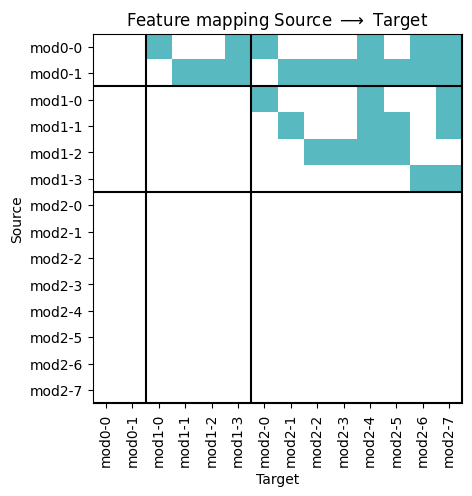
The relationship between features is formalized as directed acyclic graph. This means that if two features A and B are related, feature A points to feature B via a directed edge in the graph.
More specifically, we store this relationship in form the graph’s adjacency matrix in the mudata.MuData.varp attribute. Per default, the name of the adjacency matrix is feature mapping. We can visualize this adjacency matrix. Each green field indicates a directed connection/edge between two features from row mapping to column
ax = mdata.link.pl.adjacency_matrix(label=True)
ax.set(title="Feature mapping Source $\\longrightarrow$ Target")
[Text(0.5, 1.0, 'Feature mapping Source $\\longrightarrow$ Target')]
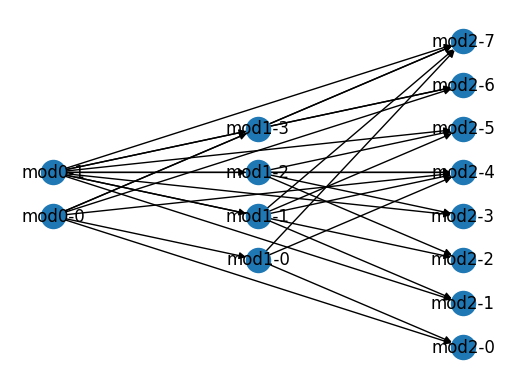
This is equivalent to the following directed graph.
mdata.link.pl.graph(with_labels=True)
Querying#
We can use this graph to find related features. For example, we can find all features that downstream to feature 0 in modality 0 (mod0-0)
mdata.link.query.descendants(features=["mod0-0"])
View of MuData object with n_obs × n_vars = 5 × 7
  varp:	'feature_mapping'
  3 modalities
    mod0:	5 × 1
    mod1:	5 × 2
mod2: 5 × 4mdata.link.query.descendants(features=["mod0-0"], include_self=False)
View of MuData object with n_obs × n_vars = 5 × 6
  varp:	'feature_mapping'
  3 modalities
    mod0:	5 × 0
    mod1:	5 × 2
    mod2:	5 × 4
Equivalently, we can find all ancestors of a specific feature.
mdata.link.query.ancestors(features=["mod2-1"])
View of MuData object with n_obs × n_vars = 5 × 3
  varp:	'feature_mapping'
  3 modalities
    mod0:	5 × 1
    mod1:	5 × 1
    mod2:	5 × 1
To get a specific modality level, you can use the standard mudata query:
subset = mdata.link.query.descendants(features=["mod0-0"])
subset.mod["mod0"].copy()
AnnData object with n_obs × n_vars = 5 × 1